
NDIS Staff Onboarding Software: How to Onboard New Support Workers Quickly
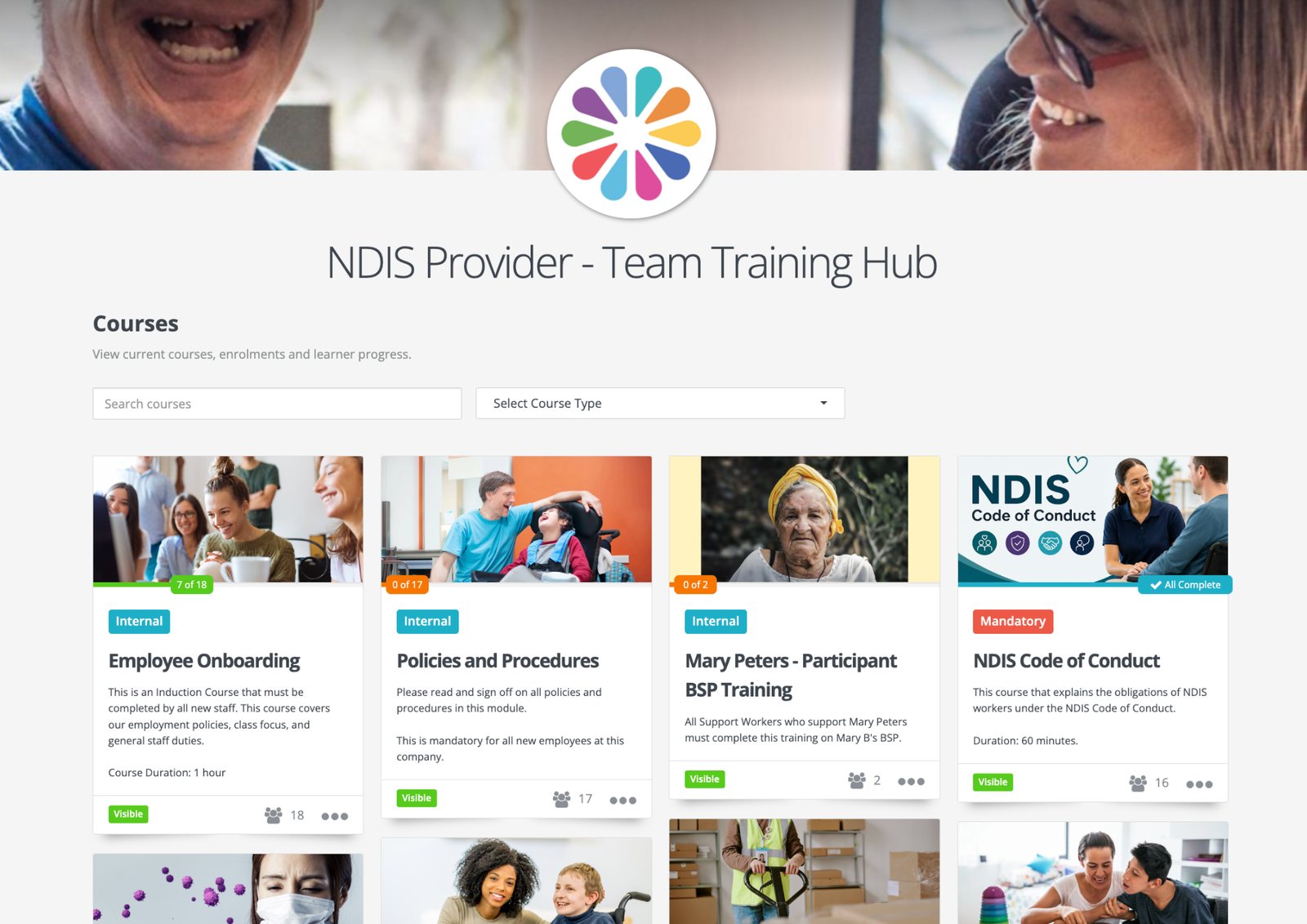
Wyzed is an Australian NDIS staff onboarding and training platform. Hire a support worker, enter them with their role, and Wyzed takes it from there. It texts them a link to their induction and training, which they do on their phone. It chases anything unfinished and keeps the records an auditor asks for. It is free to start for your whole team.
By Aaron Price, founder of Wyzed. Last reviewed 21 October 2026.
Providers already running NDIS training on Wyzed









Wyzed platform data, measured across active provider accounts, October 2026. How these figures are measured
In short: what has to happen before a new support worker works with a participant
Four things. Three of them are training: the Commission's free Worker Orientation Module, your own induction plus infection control training for every worker, and training for the site and the participants they will support. The fourth is an NDIS Worker Screening Check. It takes the longest, so start it first and do the training while you wait.
| What | What it means | Who controls the timing | Where Wyzed fits |
|---|---|---|---|
| NDIS Worker Screening Check | Needed for anyone in a risk-assessed role at a registered provider. A few states allow a supervised start while it is pending (see below) | Your state or territory screening unit | Tracks the clearance and its expiry date, and alerts you before it lapses |
| Worker Orientation Module "Quality, Safety and You" | Certified providers must include it in their induction. Verified providers must have each worker complete it | The worker, in their own time. It is free from the Commission | The worker uploads the certificate to their training record |
| Your own induction | Certified providers must have one, and every worker must complete it | You | Delivers it, collects each worker's sign-off and records it |
| Site and participant training | Workers must be trained for each participant's specific needs | You | You upload it as a short online course and Wyzed delivers it |
Source: Quality Indicators for NDIS Practice Standards Guidelines 2018, Core module, Human Resource Management indicator 3 (section 17(3)) and the Verification module (section 74(2)) and NDIS worker screening for registered providers. Participant training comes from the Core module's Responsive Support Provision indicator: workers supporting a participant with specific needs must be "appropriately trained and understand the participant's needs and preferences".
How do I onboard new NDIS support workers quickly?
Start the screening check first, because your state sets its timing. Then enter the new hire in Wyzed with their role. Wyzed texts them a link, and their induction, policies and role training arrive on their phone while the clearance is processed. The training adds up to about one working day.
| Step | What happens | Who | Time |
|---|---|---|---|
| 1. Start screening | The worker applies to the state or territory screening unit. You verify the application in the Commission portal | You and the worker | Set by the screening unit |
| 2. Enter the hire and their role | The role's courses and required documents are set up, and the welcome text goes out | Wyzed does this | About 10 seconds per worker, or hundreds at once |
| 3. Worker taps the text | They log in once. After that, every course and reminder arrives by text and opens with one tap | The worker taps. Wyzed sends the text | Minutes |
| 4. Orientation module and documents | The worker does the Commission's module and uploads its certificate. They also upload their first aid, licences and qualifications. Wyzed chases until each one is in | The worker uploads. Wyzed chases | About 90 minutes for the module, as providers report it |
| 5. Handbook and policies | The worker reads and signs each document. Wyzed records the date and time against the version they saw | The worker signs. Wyzed records | Under an hour |
| 6. Role training | The seven standard support worker courses listed below | Wyzed delivers them | About 5 hours |
| 7. Participant and site briefing | The worker reads the behaviour support plan or house procedures you uploaded, signs off, then does a buddy shift | You upload it. The worker signs off | Set by you |
| 8. Ready to roster | The dashboard shows their training is done. Once their screening clearance is through, they are ready. If your rostering system is connected, Wyzed tells it too | Wyzed does this | The same day the last item is done |
For a typical hire, the orientation module, the role training and your own induction add up to about one working day of training. The clearance runs alongside it.
Source: Welcome your new worker, NDIS Commission. The Commission calls shadow or buddy shifts "a common method" and says the experienced worker should "demonstrate and explain the key requirements and check that the new recruit is able to follow their lead".
What is the fastest way to onboard NDIS support workers with online training?
Start screening on day one, send the training to the worker's phone, and give every role a fixed ready list. With Wyzed there is no app to download: the worker taps the text, logs in once and starts. We get a whole company started in about five minutes. If you are moving from another system, we bring across your staff, policies and past training within 24 hours, so nobody repeats training.
What should your induction cover?
The Commission lists five points every induction should cover. Wyzed covers the first three with short courses and signed documents. For the last two, you record the buddy shift and the check-ins, so you can show an auditor what happened and when.
- Structure and responsibilities. What is expected of the worker, who they work with and who to ask for help.
- Capabilities for the role. The attitudes, skills and knowledge for their role in the NDIS Workforce Capability Framework, such as General Support Work.
- Policies and procedures. The key policies they must follow, plus procedures for individual participants, such as PEG feeding.
- Orientation to practice. Meeting the person they will support and learning the activities involved, often on a buddy shift.
- Ongoing support. Regular contact with peers and supervisors, especially for workers who work alone in participants' homes.
Source: Welcome your new worker, essential points to cover.
How long does the role training take?
Wyzed gives every support worker seven standard video courses, about 4 hours 55 minutes in total. These are Wyzed's standard set, not a list set by law. Medication training, for example, is only legally required for workers who give medication.
| Course | Length |
|---|---|
| NDIS Code of Conduct | 60 minutes |
| Emergency and Disaster Management (NDIS) | 75 minutes |
| Manual Handling | 40 minutes |
| Medication Management for NDIS Workers | 35 minutes |
| Incident Reporting | 35 minutes |
| Privacy and Confidentiality | 30 minutes |
| Infection Prevention and Control for NDIS | 20 minutes |
Lengths are from the live library on 20 October 2026. The library holds 96+ NDIS modules, and the ones a role needs depend on the supports you deliver.
What mandatory training do NDIS support workers need to complete?
Every worker at a registered provider must complete the Commission's Worker Orientation Module, and every worker needs infection prevention and control training with refreshers. Workers in risk-assessed roles also need a screening clearance. The rest depends on the supports you deliver. Wyzed holds the orientation certificate and screening expiry on the same record as the training.
| Layer | What it is | Is it required? |
|---|---|---|
| Named by the Commission | Worker Orientation Module "Quality, Safety and You", free and online | Yes, at every registered provider |
| Required of every worker | Infection prevention and control training, with refreshers. PPE training with refreshers for anyone giving direct support | Yes. The rules require refreshers but don't say how often |
| Required for a task | Medication, mealtime management, behaviour support and high intensity supports | Yes, where the worker does that task |
| A higher bar for SIL | Workers must be "trained and assessed as competent" in evidence based practice, including person centred and trauma informed practice, active support and supported decision making. See the competency rules that apply to SIL workers | Yes, where you deliver SIL. Completing a course is not enough on its own |
Three things people often get wrong. The Commission's separate eight-module series "New worker: NDIS induction modules" is not mandatory. A police check is not an NDIS Worker Screening Check. And the NDIS Code of Conduct applies to every provider and worker, registered or not.
Our view: first aid and CPR are not on the Commission's list, but most providers require them for roles with direct personal care. Decide this for each role and record it.
Unregistered provider, or a sole trader with one worker? The Code of Conduct still applies to you. The orientation module is only mandatory for registered providers, but it is free, and worth having every worker do it.
Source: Worker training modules, NDIS Commission and Quality Indicators Guidelines 2018, Core module (including sections 17(9) and 24(10), infection control and PPE training) and Supported Independent Living module. The Commission's page does not say how long the orientation module takes. About 90 minutes is what providers report.
For the full list by role, from the basics to SIL and high intensity supports, see our guide to what training NDIS support workers need.
How do I ensure NDIS support workers complete mandatory training before starting with clients?
Set a ready list for each role, give it to the worker the day you hire them, and check it before their first shift. In Wyzed you set the list once per role, and the dashboard shows who is done before you roster them.
The Quality Indicators require "a system to identify, plan, facilitate, record and evaluate the effectiveness of training and education for workers", including mandatory training.
Four habits make the difference:
- Write a ready list for each role. Support worker, team leader and allied health each get one: screening, orientation module, induction, role training and participant briefing.
- Attach the list to the role, not the person. Set up each role once in Wyzed with its courses and required documents. Everyone you hire into that role gets the whole list automatically.
- Let the reminders do the chasing. Wyzed texts and emails each worker before and after their due dates. It also sends you a daily or weekly summary of who is falling behind.
- Check before you roster. The dashboard shows who is done, overdue or about to expire, by team, role or site. If your rostering system is connected to Wyzed, Wyzed can also tell it when a worker is cleared.
Wyzed records and reports. It cannot stop a worker turning up to a shift. Whether you roster someone is still your call.
For a participant, upload their behaviour support plan or the house's emergency procedures as a short course and give it to the workers who support them. A plan sitting in a shared drive doesn't prove a worker read it. A dated sign-off from each worker does.
Onboarding is the first step of the wider NDIS staff training and compliance system. The same records stay up to date for as long as the worker is with you.
Can a worker start before their screening check clears?
Only in some states and territories, and only with safeguards. The Commission says some allow a worker to start a risk-assessed role after applying but before clearance, which is called "working on application". Where it is allowed, you need a written risk management plan, a cleared worker supervising them at all times, and a record that they are not yet cleared.
It is not allowed everywhere. In Queensland it is an offence for a registered NDIS provider to engage someone in risk-assessed work without a valid clearance. Check the rules in every state you work in before you roster.
From 12 October 2026, registered providers manage worker screening in the new NDIS Commission Portal. A clearance lasts 5 years, and you must keep records of workers in risk-assessed roles for 7 years.
Source: Worker screening for registered providers and Queensland Disability Worker Screening, employer requirements.
How do a free module, an induction tool and an NDIS training platform differ?
The free module covers the NDIS basics, an induction tool delivers your own content, and an NDIS training platform also tracks clearances and keeps the records an auditor asks for. HR and rostering software is in the table too, because many providers use it alongside one of these. This compares types of product, so individual products will differ. Checked 20 October 2026.
| The Commission's free orientation module | Induction and e-learning tools | HR and rostering software | Wyzed | |
|---|---|---|---|---|
| Covers the NDIS Code of Conduct | Yes | Depends on the product | Depends on the product | Yes |
| Your own policies, site and participant training | No | Usually | Sometimes | Yes |
| One record of who completed what, across all staff | No. Each certificate sits in the worker's own account | Usually | Usually | Yes |
| Tracks screening and licence expiry | No | Often | Often | Yes |
| Starts automatically when you hire in your HR or rostering system | No | Depends on the product | Not applicable. This is where you hire | Yes, through a free connection |
| Rostering, payroll and invoicing | No | No | Yes | No |
| Works offline | No | Depends on the product | Depends on the product | No |
What to look for in any platform:
- Who starts the onboarding, you or your HR system?
- How does the worker log in?
- Does it hold the handbook, policies and screening records, not just courses?
- Can you edit the content?
- Are the courses mapped to the NDIS Practice Standards?
- What reports can you export?
Wyzed can start a worker's onboarding when you hire them in your HR or rostering system. Workers log in from a link in a text. The handbook, policies, documents and training sit on one record. You can edit the courses, and 96+ NDIS modules are mapped to the Practice Standards. Completion, compliance and alert reports export to CSV, Excel or PDF, with certificates attached.
Comparing Wyzed with a specific induction tool? See the head-to-head with iinduct.
Is there an online induction platform for NDIS support workers that works on mobile?
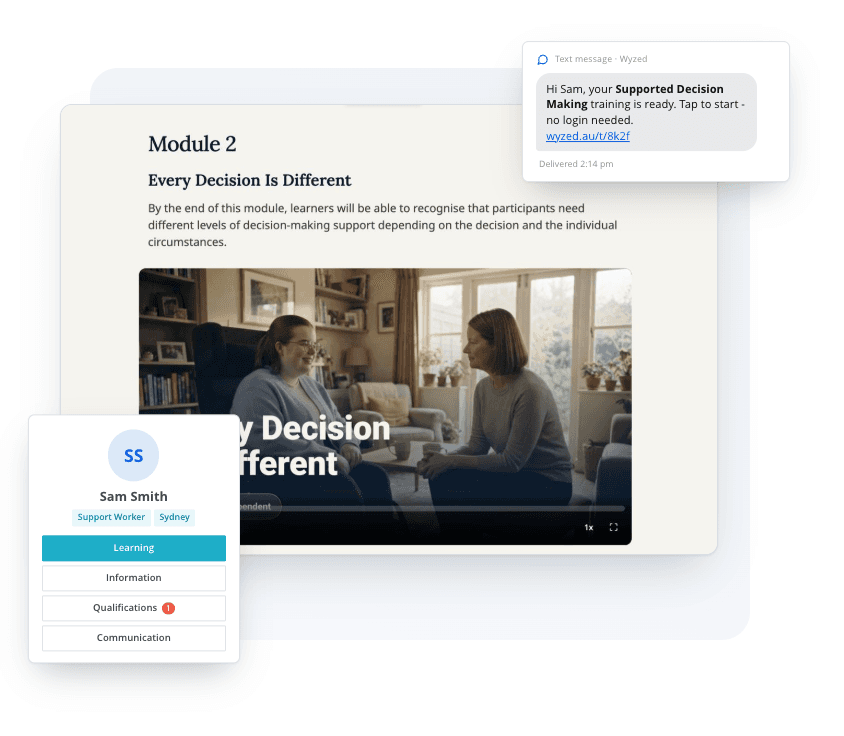
Yes. Wyzed runs in the phone's web browser, so support workers install no app. They log in once, then every course and reminder arrives by text and opens with one tap. Videos with subtitles, quizzes, policy sign-off and certificates all work on a phone. It needs an internet connection, because there is no offline mode.
Workers can also upload a photo of their first aid certificate or licence from their phone. Because there is no offline mode, think about this if your workers often train with no mobile coverage.
What Wyzed does not do
- It does not issue screening clearances. Your state or territory unit does that. Wyzed tracks the clearance and its expiry date.
- It does not replace the Commission's Worker Orientation Module. That module is free and you use it as it is.
- It does not watch a worker on the job. A buddy shift or a practical assessment is done by a person, and you record the result.
- It is not rostering or payroll software. It connects to yours.
- It does not guarantee an audit result. It produces the records an auditor asks for.
What have Wyzed customers seen?
Wyzed modules are independently audited by a third-party NDIS auditor and accredited. They are developed by experts, mapped to the NDIS Practice Standards and aligned with the Workforce Capability Framework.
Our customers report 1,000+ audits across 350+ NDIS providers, with no non-conformities related to training (Wyzed platform data, October 2026). We have not checked each audit ourselves, and past results are not a promise about any future audit.
Home Caring runs about 2,000 staff on Wyzed. New hires come straight across from their HR system and are onboarded without anyone in the office setting them up. Allara Support Services starts onboarding from Employment Hero, and each worker's finished training goes back into Employment Hero. Tender Loving Care enters new staff by hand, and Wyzed takes it from there. Other providers include MultiCap, Maple Services, Siblings Care, Disability Connect Victoria, Accord Care and Care Agency Service.
"I've tried a lot of different training systems in my 20-year career but nothing even comes close to how fast and easy Wyzed is for the staff to use and how easy it is for the admins. The whole team has embraced it and we had 100% compliance across 200 employees, which I've never seen before in any system ever. It is so easy and the team are so great to work with at Wyzed. The roll out took less than 24 hours and everything's been smooth since. We couldn't believe it. Would highly recommend Wyzed to anyone needing staff training that just works."
Chris Lynch, Learning, Development and Culture Coordinator, Family Based Care Tasmania
"I honestly can't believe how easy Wyzed is. We rolled it out to our 50+ team in less than an hour. Everyone completed their training and no one got stuck or had any issues at all. We've never rolled out a system like it. It just works. I would highly recommend Wyzed to anyone looking to train your staff and keep your staff compliant."
Tiaki Support Services, HR Manager
How much does NDIS onboarding software cost with Wyzed?
You start with free access. Your whole team can use Wyzed, with no limit on staff. It includes every module and downloadable certificates, and we set it up for you. No credit card and no obligation.
If you keep using Wyzed, you pay per user per year, with every module and update included. Prices are in AUD, as on the Wyzed pricing page on 20 October 2026:
| Band | Price | Note |
|---|---|---|
| Up to 100 users | $96 per user per year | Minimum 30 seats |
| 100+ users | $72 per user per year | |
| 200+ users | Custom volume pricing | For large or multi-entity providers |
The 30-seat minimum applies to the paid plan only. It does not limit who can use Wyzed. For a small provider or a sole trader, that means a minimum of $2,880 a year (30 seats at $96), even with only a few workers. Use the free access to try the whole system first, and ask us for the exact figure for your team before you decide.
Get free access for your entire company now
Unlimited staff. Unlimited access to all 96+ modules. We launch it in your company for you, and there is no credit card.
If you want to stay past your free access there is an optional subscription. It is only ever optional.















About the author
Aaron Price, Founder of Wyzed
Aaron is the founder of Wyzed, the NDIS staff training and compliance system. Over the past decade he has personally run more than 300 LMS implementations, first in other industries and now across NDIS providers, and has sat on the provider side of the audits this page describes. He built Wyzed to be the easiest training system NDIS support workers will actually use.
Connect with Aaron on LinkedIn.
How this page is maintained
Every regulatory statement is checked against the NDIS Quality and Safeguards Commission's own published pages and carries a visible link to the most specific source.
Reviewed on publication and re-checked whenever the Commission updates the Practice Standards, the audit process or the registration rules. Platform figures are restated from Wyzed system data with the month they were measured.
What this page is and is not
Wyzed is an independent software company. It is not endorsed by or affiliated with the NDIS Quality and Safeguards Commission. This page explains what the rules require and how Wyzed works. It is not legal advice. Your obligations depend on your registration groups, the supports you deliver and the states you work in.
Sources and methodology
Primary sources:
- NDIS (Quality Indicators for NDIS Practice Standards) Guidelines 2018: the induction requirement (section 17(3), Core), the Verification version (section 74(2)), the training system indicator in Human Resource Management, and the Responsive Support Provision and Supported Independent Living wording quoted above.
- Worker training modules: the orientation module, and the separate eight-module induction series.
- Welcome your new worker: the five induction points and buddy shifts.
- Worker screening for registered providers: risk-assessed roles, working on application, the 5-year clearance, the 7-year record and the portal change on 12 October 2026.
- Queensland Disability Worker Screening: the Queensland offence.
We read the regulator pages on 20 October 2026.
Wyzed figures: 350+ providers and 1,000+ audits are Wyzed platform data as at October 2026, and customers report the audits to us. 96+ NDIS modules is a minimum count from the Wyzed library, which grows every month. Course lengths come from the live library on 20 October 2026, and 4 hours 55 minutes is the total of the seven courses in the table. "About 10 seconds" is how long it takes to enter a worker and their role. "About five minutes" is how long it takes to get a whole company started. "Under 24 hours" is how long a move from another system takes, including past training records. These are Wyzed's own times and have not been measured independently. The product comparison was made on 20 October 2026 from public product information and describes types of product, not individual products. Pricing is from the Wyzed pricing page on 20 October 2026.
Go deeper into the system
Frequently asked questions
What does Wyzed do for onboarding NDIS support workers in Australia?
Wyzed is Australian NDIS staff training and compliance software that runs onboarding from the day you hire someone. It texts each worker a link to their handbook, policies and role training. It tracks screening and licence expiry, and exports the reports an auditor asks for. It has 96+ NDIS modules.
I need an NDIS training platform for new support worker onboarding. What should I look for?
Check six things. Who starts the onboarding? How does the worker log in? Does it hold the handbook, policies and screening records? Can you edit the content? Do courses map to the Practice Standards? What reports can you export? Then ask what it does not do, such as offline use or rostering.
What is an online induction platform for disability support workers in Australia?
It is software that delivers a new worker's induction, policy sign-off and role training online, and records who completed what for audits. Wyzed is one. It texts each worker a link, tracks their screening and licence expiry, and keeps every completion and certificate on their training record.
Can a worker start before their NDIS Worker Screening Check clears?
Only in some states and territories, with a written risk management plan and a cleared worker supervising them at all times. In Queensland it is an offence, so check the rules where you operate.
Where does the NDIS induction requirement come from?
From the Quality Indicators for NDIS Practice Standards Guidelines 2018, not the Practice Standards Rules. Providers with a full certification audit must run an induction that includes the Worker Orientation Module (section 17(3)). Providers with a verification audit only need each worker to complete the module (section 74(2)).
Can we upload our own induction, policies and handbook?
Yes. Upload documents, videos, handbooks, policies, procedures, behaviour support plans and quizzes, and edit Wyzed's own courses. Workers sign off each policy, and Wyzed records their name, the date and time, and the version they saw. When you update a policy, you can see who has signed the new one.
Can we require workers to pass before it counts as complete?
Yes. Set a pass mark for a whole course, or require every section to be passed, on the courses where it matters.
Can training be tied to a particular house or participant?
Yes. Upload the house procedures or the participant's behaviour support plan as a short course and give it to the workers who need it. You can then check who has completed it before rostering them there.
Does Wyzed track NDIS worker screening and first aid expiry?
Yes. Wyzed collects screening, first aid, police check and qualification documents and tracks each expiry date. It alerts the worker and you before anything lapses. Wyzed does not issue screening clearances: your state or territory unit does. Reports by team, role or site export to CSV, Excel or PDF.
Can Wyzed start onboarding when we hire someone in our HR or rostering system?
Yes. Wyzed has a free connection (an API) for HR, payroll and rostering systems. When you hire someone there, Wyzed sets them up and starts their onboarding with nobody logging in. Allara Support Services does this from Employment Hero, and each worker's finished training goes back into Employment Hero. Connecting a new system usually takes about half an hour.
What reports do we get for an NDIS audit?
Course completion, progress, compliance and alert reports. You can filter them by team, role, site or location and export them to CSV, Excel or PDF, with certificates attached.
How is Wyzed different from generic induction software?
Generic induction software is mostly built for contractor and site safety inductions, not the NDIS Practice Standards. Wyzed has 96+ NDIS video modules, tracks the licences and clearances NDIS workers need, and produces the records an auditor asks for.
How long does it take to switch to Wyzed from another system?
Under 24 hours, and we do the work. We upload your staff, policies and behaviour support plans. We also bring across your courses and everyone's past training, so nobody repeats it.
Give your team the easiest NDIS training there is

Wyzed Pty Ltd, Suite 103, 95-109 Crown Street, 2500 Wollongong, Australia.
© 2026 Wyzed Pty Ltd.